Professional Keyword Research Guide
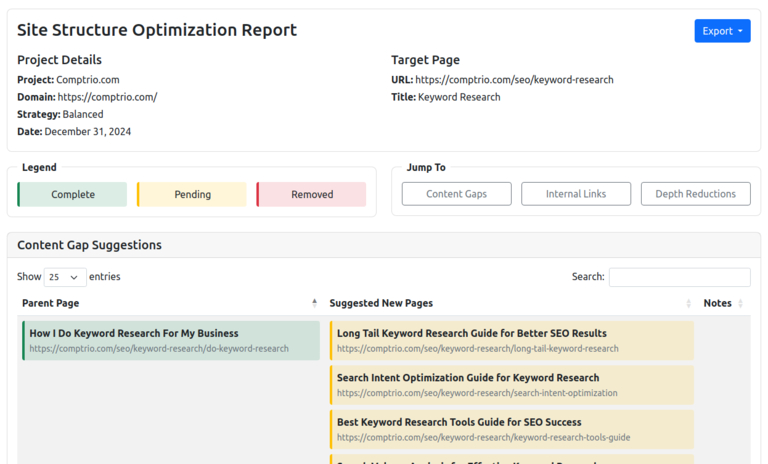
Professional Keyword Research is ordered for one page and lands in your Reports dashboard within 24 hours. You get about 100 keywords with search volume and difficulty from Ahrefs, about 100 new page recommendations with suggested titles and H1s, and about 100 internal linking opportunities, all read by 25 years of SEO experience and calculated against your own site's link structure. A Page Optimization run on that page, aimed at the keywords chosen, is included. LinkMap's manual keyword tools stay free either way, and the price is on the pricing page.
What You Receive
The keywords come from Ahrefs, with monthly search volume and a difficulty rating for each, and they are split between terms your page can compete for now on its current authority and higher-value terms to grow into as its topical relevance builds. That split is the difference between a list and a plan, and it is what going beyond a difficulty score means in practice.
The new page recommendations each carry a suggested title and H1 and a place in your site structure. They are chosen because they would feed authority to the target page, not because the keyword is there, so each one plugs into your link architecture where it does the most for the page you ordered the research for.
The internal linking opportunities are calculated on your crawl: which existing pages already hold relevant topical weight, which links would move the most authority to the target, and the reasoning behind each one. The exact counts vary with the size of your site and the keyword space around the page.
How To Order
- Select the target page in your site visualization
- Click "Professional Keyword Research" in the page details
- Complete the one-time payment for that page
- Receive your analysis in the Reports dashboard within 24 hours
A balanced optimization run is a common way to find the page worth ordering for, since it surfaces the pages the rest of the site is not yet supporting.
After The Report
Build the recommended pages and add the suggested links through your CMS. The report gives titles, headings and linking instructions with the reasoning behind each, so no SEO background is needed to act on it, and the SEO strategy guide covers how it fits the larger plan.
Assign the keywords to their pages with LinkMap's keyword management tools to track how they perform over time. The included optimization run draws the recommended pages and links onto your map as planned, with their keywords already attached, so the plan is on the LinkMap before you build any of it.
Ready to start? Open your site visualization, select a page, and click "Professional Keyword Research".
What Does the Math Say
About Your Site?
Finding out is free and takes minutes.