Balanced Optimization Strategy Guide
Balanced optimization runs all three analyses, authority, content and structure, on one target page and draws the best links from each onto your LinkMap as planned links. It is the recommended default in the optimization modal. Pick Authority Focus, Content Relevance or Structural instead when you already know which of the three the page is missing, and see the SEO strategy guide for how the four fit together.
If you are not sure this is the strategy your site needs right now, what do I do next reads your account and names the work worth doing first.
When To Choose Balanced
Choose balanced when you are not sure which of the three the target page needs, or when it needs more than one. A page that is deep in the site, thin on links from strong pages and disconnected from its topic cluster gets all three addressed in one run, and no single fix is pushed so far that it distorts the rest of the site.
What The Analysis Does
Pick the page in your site visualization, open the optimization modal and choose Balanced. The first thing the run does is save a snapshot of the site as it stands, labeled as the pre-optimization state, so the before-and-after is on the timeline.
It then builds three indexes for the target page. The content index scores pages that share its topic and should be linked to it. The authority index scores every page that could pass authority to it and keeps the ten strongest sources. The structural index finds the pages sitting too deep and the shallower pages that could pull them up.
The three lists are merged, duplicate pairs collapsed to their higher score, and the fifty best links kept, and the five pages most like the target decide where any new pages are placed. That merge is what makes it balanced: the best fifty across all three analyses are what get drawn, whichever analysis found them.
What You Get Back
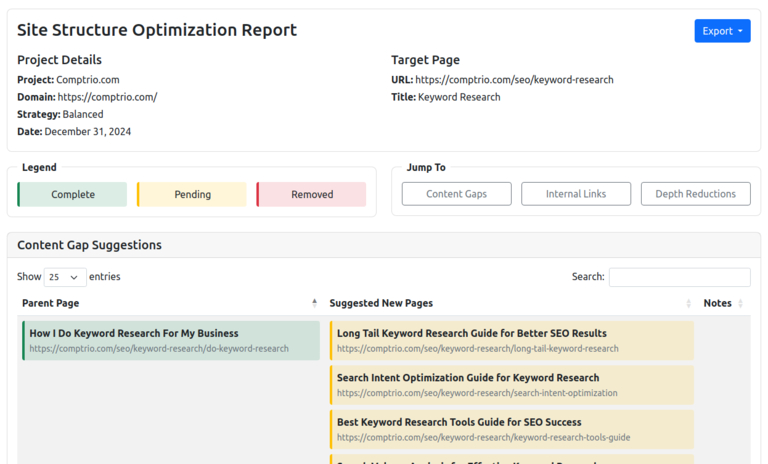
The result is drawn on the map and summarized in a report under Reports, with Internal Link Suggestions, Content Gap Suggestions and Depth Reduction Suggestions. Each chosen link appears as a planned relationship, a dashed line between the source and the target, so you can see what changes before anything on the site does. Where the content analysis finds a gap in the topic, it adds a planned page to fill it, with its own structural links, and if you have ordered keyword research on that page, the new page's keyword goes into that order.
Planned means exactly that: the map holds the plan, and building it on the site is yours to do. Discard any planned link you disagree with using the page relationship management tools. The next crawl records what was actually built, and the pre-optimization snapshot stays on the timeline for the comparison.
Next Steps
Once the links are live, share the visualization with the timeline so the client can see the before and after, and watch the target page's rankings against the snapshot date. If the run added planned pages, professional keyword research on their keywords tells you what those pages need to rank. Each optimization run is a one-time paid analysis per page, priced on the pricing page.
What Does the Math Say
About Your Site?
Finding out is free and takes minutes.