Content Relevance Guide
Content relevance is one of four strategies you choose between when you order Page Optimization for a page. The run draws its planned links onto your LinkMap and files a report under Reports within an hour or two. It works on the topic groups your content already forms rather than on the link structure underneath them.
The other three are Balanced, Authority focus and Structural. Pick this one when the site is wired reasonably well and the question is which pages belong together.
When to Pick This One
Choose content relevance when you have a lot of pages on related subjects and no strong sense of which ones support which. It is the strategy for a blog that grew a section at a time, where the linking followed whatever was on the writer's mind that week.
Choose authority focus instead when the target page is the point and you want the rest of the site pushing at it. Choose balanced when you are not sure, which is why it is the default on the order form.
What a Topical Cluster Is
A topical cluster is a group of your pages that cover the same ground and link to each other more than they link out. On a LinkMap it shows up as a knot of nodes sitting closer together than the pages around them.
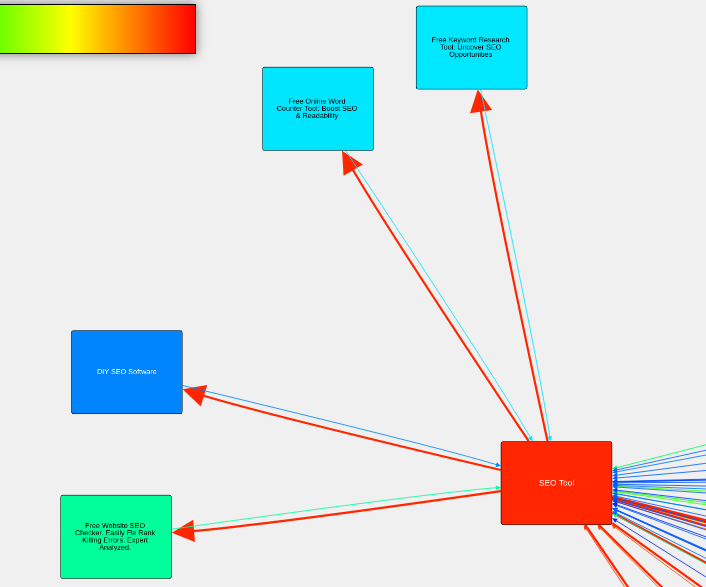
Color on that map is PageValue, not relatedness, so read a cluster from how tightly its pages link to one another rather than from the palette. A tight group in dull colors is still a cluster; it is a cluster nothing else on the site is pointing at.
What the Report Contains
The analysis reads the text of your pages, finds which ones cover the same ground, and compares that against the links you actually have. The recommendations come back in three parts.
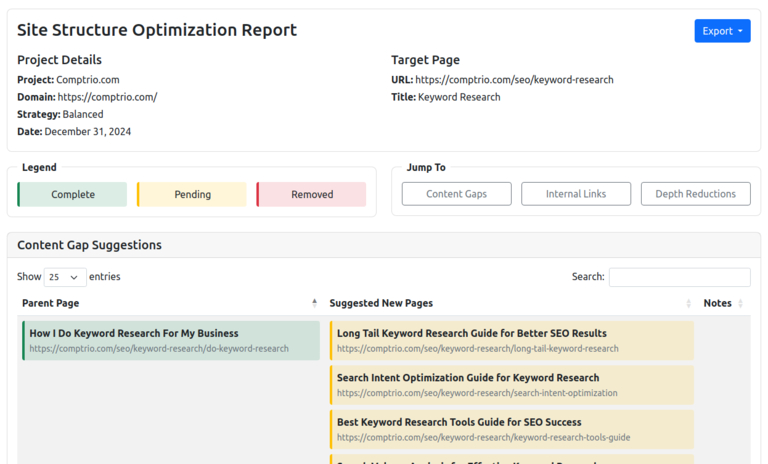
Internal Link Suggestions are the first: existing pages that belong linked to your target and are not, drawn as planned links in both directions, so you can work down them. These are links between pages you already own, which makes them the cheapest change on the list.
Content Gap Suggestions are the second: pages your cluster is missing, added to the map as planned pages under the right parent, each with a suggested title. A gap is a suggestion for what to write next, drawn from what your own pages already cover.
Depth Reduction Suggestions are the third: pages in the cluster sitting too deep, and the one link that pulls each of them closer.
Acting on the Recommendations
The planned links and pages are already on the map. Keep the ones you agree with and discard the rest in the relationship interface, which keeps the map in step with the site.
Build the pages you keep, then recrawl and look at the same cluster again; the group should be visibly tighter, and that is the check on whether the work landed.
What This Will Not Tell You
It will not tell you whether anyone searches for the gap it found. The analysis reads your site, not a keyword tool, so a gap is a hole in your coverage rather than proof of demand.
That is the reason to pair it with keyword data. Professional keyword research is ordered for one page and comes back inside 24 hours with Ahrefs data read by a person, and the free keyword tools in LinkMap cover the smaller questions.
It also will not write anything. What you get is a list of links to add and pages you are missing, already drawn onto the map, which is a morning of work rather than a strategy document.
What Does the Math Say
About Your Site?
Finding out is free and takes minutes.